Core Concepts: How CertHub Works

Separating Data from Documents: The CertHub Approach

Traditional compliance and documentation systems often mix raw data with final documents, leading to redundancies, inconsistencies, and inefficiencies. CertHub separates data input from document generation, ensuring that every compliance-related element is structured, reusable, and traceable.

CertHub Big Picture This overview illustrates CertHub's fundamental approach to regulatory compliance: separating the world of structured data from document generation. It shows how CertHub thinks about compliance - not as a document-first approach, but as a data-driven system where documents are dynamic outputs of well-structured information. The modules shown here represent the core building blocks of this philosophy.

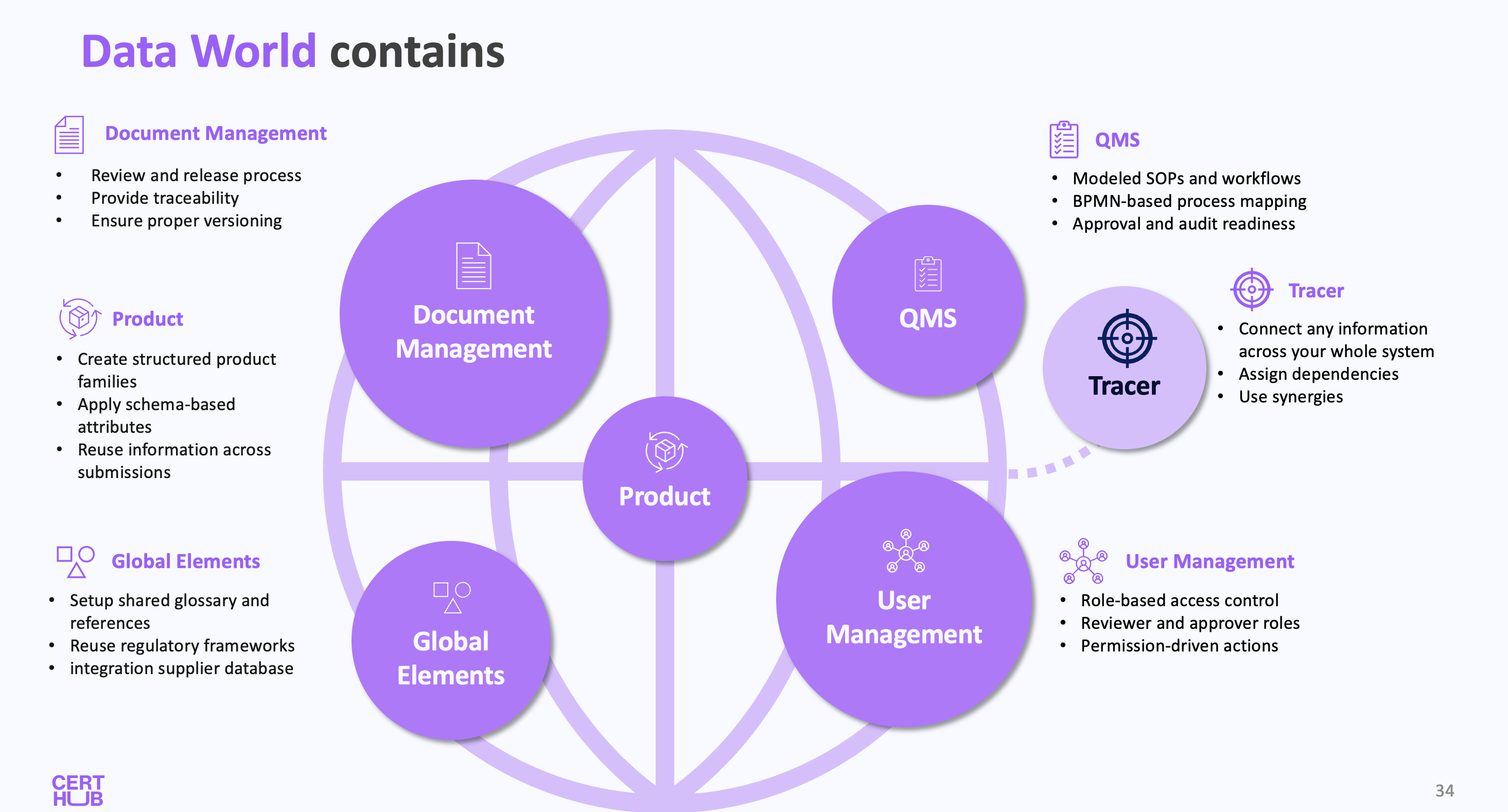
To understand how CertHub works, we differentiate between two interconnected worlds shown in the overview image above:

Data World: Structured Input & Traceability

The Data World, shown on the left side of the overview, serves as the foundation for all structured regulatory and quality-related data. It consists of several key modules, each of which is explained in detail in the Modules section of this documentation:

QMS Module

As shown in the QMS section of the overview, this is where you maintain all process-related data. Here, QM teams can:

  • Create and maintain SOPs, Sub-processes, and Work Instructions
  • Model processes using BPMN
  • Link Documents and Data Inputs to specific process steps
  • Define forms and schemas for data collection

Product Data Management

In the Product section of the overview, you can see how CertHub organizes product-related information:

  • Group products into Product Families to reuse common information
  • Maintain all product-related data in a structured format (Knowledge Units and Topics)
  • Use Schema Libraries to define what data must be provided for products
  • Ensure consistency in how product data is collected across your organization

Global Elements (coming in Q1 2025)

The Global Elements section shows the foundational data that can be reused across the system:

  • Glossary for consistent terminology
  • Regulations for compliance reference
  • Suppliers and other shared information

User Management

The User Management module, visible at the bottom of the Data World, enables organizations to:

  • Create and manage user accounts
  • Define custom roles with specific permissions
  • Assign roles to users based on their responsibilities
  • Control access to different parts of the system
  • Ensure proper authorization for QM actions

Document (File) Management

The Document Management section allows you to:

  • Upload and store supporting files (like images or PDFs)
  • Manage traditional document assets
  • Maintain a structured file hierarchy

Understanding the Building Blocks: Key Terminology

Before we dive deeper into how CertHub handles data, it's important to understand some key concepts that represent a new way of thinking about regulatory information. Instead of thinking in terms of documents, we need to think in terms of structured data and how it's organized.

Schemas Define How Data Is Collected

A schema in CertHub is a structured model that dictates:

  • What data needs to be collected (e.g., product specifications, risk assessments, intended use).
  • The format of the data (text, dropdown, number, reference to another dataset).
  • Validation rules (ensuring regulatory compliance, preventing incorrect entries).

CertHub provides predefined schemas that align with regulatory requirements such as MDR, IVDR, and FDA while allowing full customization for specific business needs.

Example:
A product schema in CertHub might include fields for:

  • Product Name (text input)
  • Intended Purpose (text input)
  • UDI (Unique Device Identifier) (structured number format)
  • Regulatory Status (dropdown selection)
  • Reference to Risk Management Data (link to another structured dataset)

Single Source of Truth (SSOT) Data Items

Once data is entered into CertHub, it becomes an SSOT item—the authoritative, up-to-date version of that information.

  • Consistency Across Documents: Any changes made to an SSOT item automatically update all linked objects or documents.
  • Prevents Duplicate Work: Data is stored once and reused dynamically.
  • Traceability: Every SSOT item includes a version history, ensuring that changes are documented.

Example:
The UDI (Unique Device Identifier) for a medical device is stored as an SSOT item.

  • If the UDI changes, all related documents (Technical Documentation, Submissions, QMS records) are automatically updated.
  • No need to manually search for and update every occurrence in different files.

Flexible Data Input & Custom Forms

CertHub supports multiple ways to input regulatory and product-related data, ensuring flexibility for different compliance needs.

Dynamic Forms

Users can create custom-configurable input masks to standardize data collection.

  • Fields can be mandatory or optional.
  • Forms can be linked to specific regulatory schemas.
  • Supports structured lists (e.g., list of product variants).

Example:
A Risk Management Form might include:

  • Hazard Identification (predefined dropdown list).
  • Risk Level Assessment (numerical value or fixed categories).
  • Mitigation Measures (free-text field or reference to another SSOT item).

Automated Data Imports

  • Users can bulk import structured data from spreadsheets and soon also from external databases or connected systems.
  • CertHub automatically maps imported data to the correct schema.

Traditional Document Editing & Unstructured Data Input

While CertHub is designed to leverage structured data (SSOT items) for automation, users can still manually input content when needed.

  • Free-Text Input: Users can write unstructured content directly in the document editor.
  • Standalone Documents: Documents can be created without linking to SSOT data, allowing for more flexible or one-off content.
  • Manual Data Entry: Forms and fields can be used without enforcing strict data schemas, providing a hybrid approach between structured and unstructured documentation.

Example:

  • A team might create an ad-hoc regulatory response document that does not rely on SSOT items.
  • Users working on historical compliance reports might upload pre-existing PDFs instead of re-entering structured data.

Attaching External Documents Without Structuring Data

Some regulatory documents or records do not need to be fully structured in CertHub but still must be included in submissions or compliance records.

  • Users can upload PDFs, Word files, and scanned documents without converting them into structured data.
  • This is useful for:
    • Installation Instructions
    • Laboratory Reports (e.g., Biocompatibility, Sterilization Validation)
    • Third-Party Certificates and Supplier Declarations
    • Legal and Contractual Documents

Example:

  • A company receives a biocompatibility test report as a PDF from a third-party lab. Instead of converting it into structured data, they simply attach it to the relevant compliance record.
  • Installation and maintenance manuals for complex medical devices may not require structuring in CertHub but still need to be stored and referenced.

Why Keep All Options?

CertHub ensures full flexibility by allowing teams to choose between:
Automated, structured data workflows for compliance-critical documentation.
Traditional, manual document creation for non-repetitive or one-off cases.
Attaching external documents when structuring the data is unnecessary or impractical.

This hybrid approach lets organizations transition at their own pace, progressively adopting structured compliance management while still maintaining full control over how documentation is handled.

Document World: Smart Reuse & Automated Document Generation

The Document World, shown on the right side of the overview, demonstrates how CertHub transforms structured data into compliant documentation. As illustrated in the overview:

  1. Templates serve as blueprints for your documents:

    • Contains placeholders for dynamic content
    • Define the structure and format of documents
    • Can be reused across multiple documents
  2. Documents are created by:

    • Selecting a template
    • Linking it to concrete objects (products, processes, etc.)
    • Automatically replacing placeholders with actual data
  3. Submissions allow you to:

    • Combine multiple documents in a structured way
    • Organize documentation for regulatory submissions
    • Maintain relationships between related documents
  4. PDF Generation

    • Any document can be rendered into a PDF
    • Maintains formatting and structure
    • Perfect for regulatory submissions

How CertHub Automates Document Creation

Instead of manually updating templates, CertHub pulls live SSOT data into documents. A user can set those references directly in the text editor and specify exactly how the SSoT data should be used in the document. This Eliminates manual errors and ensures compliance documents are always up to date.

Dynamic SSOT in Template In this example, we can see how CertHub will pull the data of an arbitrary product, reusing its SSOT Data to generate the document. This ensures that the document always contains the most up-to-date information from the selected product.

Example:

  • A Technical File (Annex II, MDR) automatically includes the latest SSOT data for product specifications, risk management, and clinical evaluation.
  • Changes to any data item instantly update all linked documents.

Traceability: Connecting Objects in CertHub

Now that we've explored the various objects you can create in CertHub (SOPs, Documents, Submissions, SSOT Data, Records, etc.), we need a way to represent and manage their relationships. This is where CertHub's Tracer functionality comes in, providing a powerful system for connecting and tracking relationships between all compliance-relevant objects.

In traditional, document-centric compliance systems, relationships between different objects are often implicit, unstructured, and difficult to track. CertHub's Tracer introduces a flexible traceability system, allowing users to establish explicit, structured links between any objects in the system.

Linking Objects with the Tracer

The Tracer allows users to freely define relationships between any objects to create a network of linked compliance data. This flexibility ensures structured traceability across regulatory processes.

Common tracing scenarios include:

  • Documents and Regulatory Data – e.g., linking a Risk Table to a Risk Report to ensure consistency
  • Templates and Quality Processes – e.g., linking an SOP Template to a CAPA Process to align workflows
  • Product Data and Technical Documentation – e.g., linking a Product's Intended Purpose to its regulatory documentation
  • Regulations and Process Workflows – e.g., ensuring an SOP references specific MDR/IVDR requirements
  • Audit Findings and Change Management – e.g., linking a Non-Conformance Report to an Approval Process for follow-ups

Example Use Cases:

  • A Risk Table from the risk management module can be linked to multiple reports, ensuring real-time updates across compliance documentation
  • A Product's Intended Purpose can be referenced in multiple regulatory documents, ensuring that changes are propagated automatically
  • A Complaint Handling Process can be linked to specific QMS documents and supplier audits to ensure full traceability of corrective actions

Since these relationships are flexible and user-defined, the Tracer adapts to different compliance workflows, rather than enforcing a rigid structure.

Understanding the Impact of Changes

One of the main advantages of the Tracer is that it helps organizations understand how different compliance elements are interconnected. If one object changes, users can quickly identify related objects that may also need updates.

Example:

  • If a product classification changes, all linked documentation (e.g., labeling requirements, risk assessments) can be easily reviewed and updated
  • If an SOP is revised, linked processes and templates are clearly identifiable, making it easier to align documentation with procedural updates
  • When an audit finding is recorded, it can be linked to CAPA records, ensuring follow-up actions are correctly documented

In traditional compliance systems, users manually search for dependencies across static documents. The Tracer eliminates this inefficiency by providing structured, traceable relationships between compliance objects.

The Value of the Tracer

Unlike traditional Word-based systems, where objects exist in isolated silos, CertHub's Tracer provides:

A structured way to maintain relationships between compliance objects
Full flexibility – Users decide what should be linked based on their workflow needs
Better control over object consistency, reducing redundant updates
A clear overview of dependencies, making compliance efforts more transparent

By enabling fully dynamic and customizable traceability, the Tracer helps companies organize compliance-critical relationships more effectively, making it easier to keep regulatory documentation consistent, up to date, and aligned with processes.

Looking Ahead: A Living System

While this overview shows the core modules and CertHub's fundamental approach to separating data from documents, it's important to understand that CertHub is a living system where data and documents constantly evolve. Every object in the system - whether it's a piece of product data, a process definition, or a document - goes through controlled lifecycles and changes.

This is why CertHub implements robust versioning and approval processes, which we'll explore in detail in the next chapter. These processes ensure that:

  • Every change is tracked and auditable
  • Updates follow controlled workflows
  • Changes are properly reviewed and approved
  • The impact of changes can be assessed
  • A complete history is maintained

By combining this structured approach to change management with the separation of data and documents, CertHub provides a comprehensive solution for maintaining regulatory compliance in an ever-evolving regulatory landscape.